

You buy a used iPhone, iPad, or Apple Watch. It powers on, looks clean, and then the setup screen stops you cold. Activation Lock asks for someone else's Apple ID and password, and the device you thought was a bargain suddenly feels useless.
This is one of the most common points of confusion in the repair trade because it looks like a device problem, but it isn't. It's not a dead battery, a cracked OLED, a bad dock flex, or a board-level fault. It's an account security lock tied to Apple's servers. No replacement screen, battery, charging port, or camera module will remove it.
That hard distinction matters for buyers, resellers, and repair shops. If you're searching for how to remove Activation Lock without previous owner access, there are legitimate paths. There are also dead ends dressed up as “software bypasses”, “IMEI services”, and “special tools”. Knowing the difference saves time, money, and a lot of bad decisions.
Table of Contents
- You Have a Locked Device Now What
- The Only Official Paths to Remove Activation Lock
- A Guide for Australian Repair Shops and Technicians
- How to Identify and Avoid Activation Lock Scams
- The Hard Truth About Bypass Tools and DNS Methods
- Activation Lock Questions Answered
You Have a Locked Device Now What
The usual story is simple. Someone buys a second-hand iPhone from a marketplace listing, picks up an iPad from a clearance tray, or takes in an Apple Watch from a customer who says it “just needs a reset”. Then setup begins, the device checks in with Apple, and the Activation Lock screen appears.
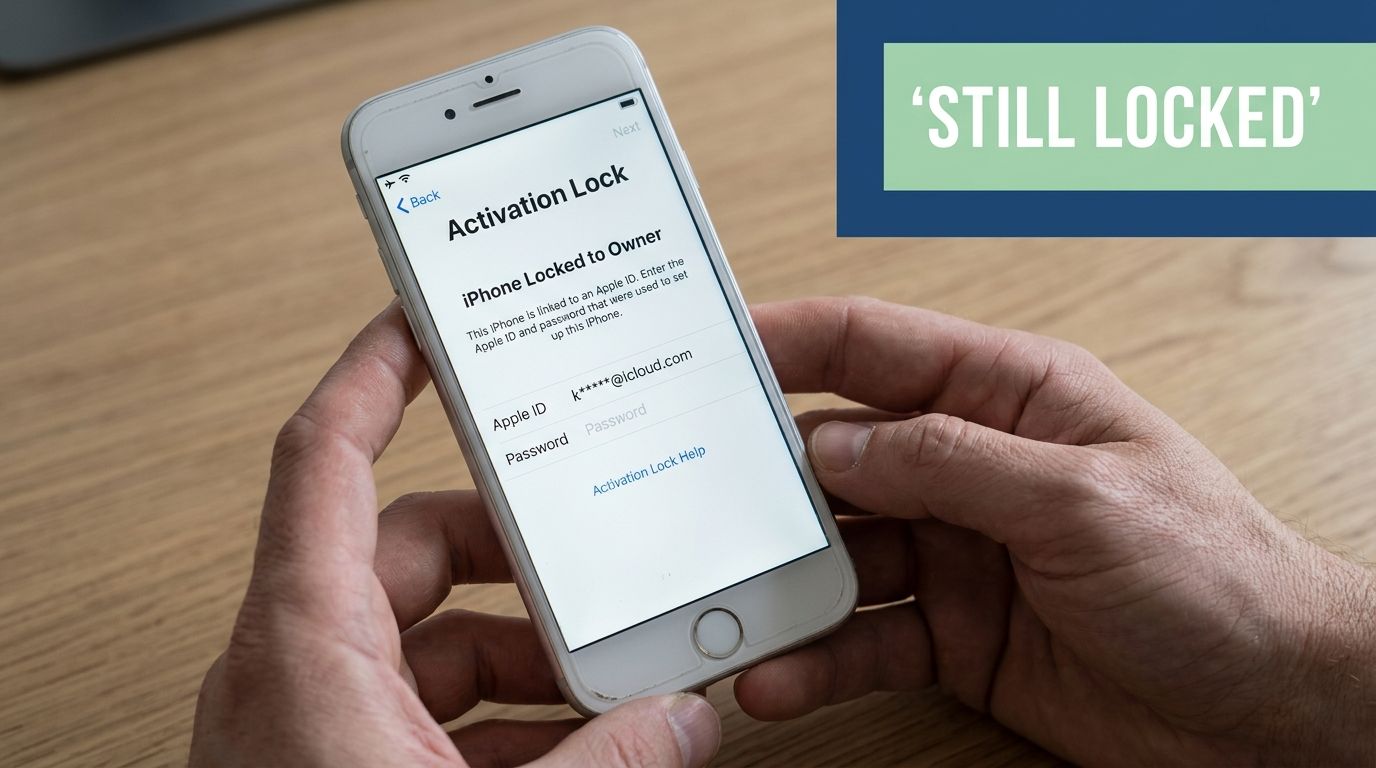
At that moment, a lot of people make the same wrong assumption. They think the lock must be stored somewhere on the handset and that a skilled technician can clear it the way they'd replace a battery or recover a device after a software crash. That isn't how this works.
Activation Lock is a security feature designed to stop unauthorised reuse of an Apple device after it has been linked to an Apple ID. From a repair bench perspective, that means you're not looking at a failed part. You're looking at an ownership and account issue.
Practical rule: If the problem lives on Apple's servers, hardware parts won't solve it.
That's why this issue sits outside normal parts supply and normal repair workflow. You can fit a premium replacement display, a fresh battery, or even finish a full housing rebuild, and the device will still stop at Activation Lock if the account tie remains in place.
The first decision to make
Before spending money, work out which situation you're in:
- You know the seller: Contact them straight away and ask them to remove the device from their account.
- You have purchase records: Gather every document that shows lawful ownership.
- You bought it from a stranger with no paperwork: Be careful. Your options may be very limited.
If the device came from a marketplace sale, don't keep troubleshooting random internet fixes first. Preserve the chat history, invoice, receipt, or listing details. Those records can matter more than any cable or software tool.
For buyers who are trying to confirm whether a device's identity details line up with what they were sold, it's also worth understanding how identifiers are commonly discussed in the second-hand market. This guide on tracking Android or iPhone with IMEI number gives useful background on the role those identifiers play, even though IMEI-based checks won't remove Activation Lock.
What not to do in a panic
People often rush into one of three mistakes:
- Paying an activation lock removal website immediately
- Handing the device to a shop that promises a “board fix”
- Installing unknown software on a Mac or PC
All three can waste your time. The right approach starts with ownership, not with tools.
The Only Official Paths to Remove Activation Lock
There are only two legitimate routes that matter in practice. One is easy when the previous owner cooperates. The other depends on whether you can prove the device is lawfully yours.
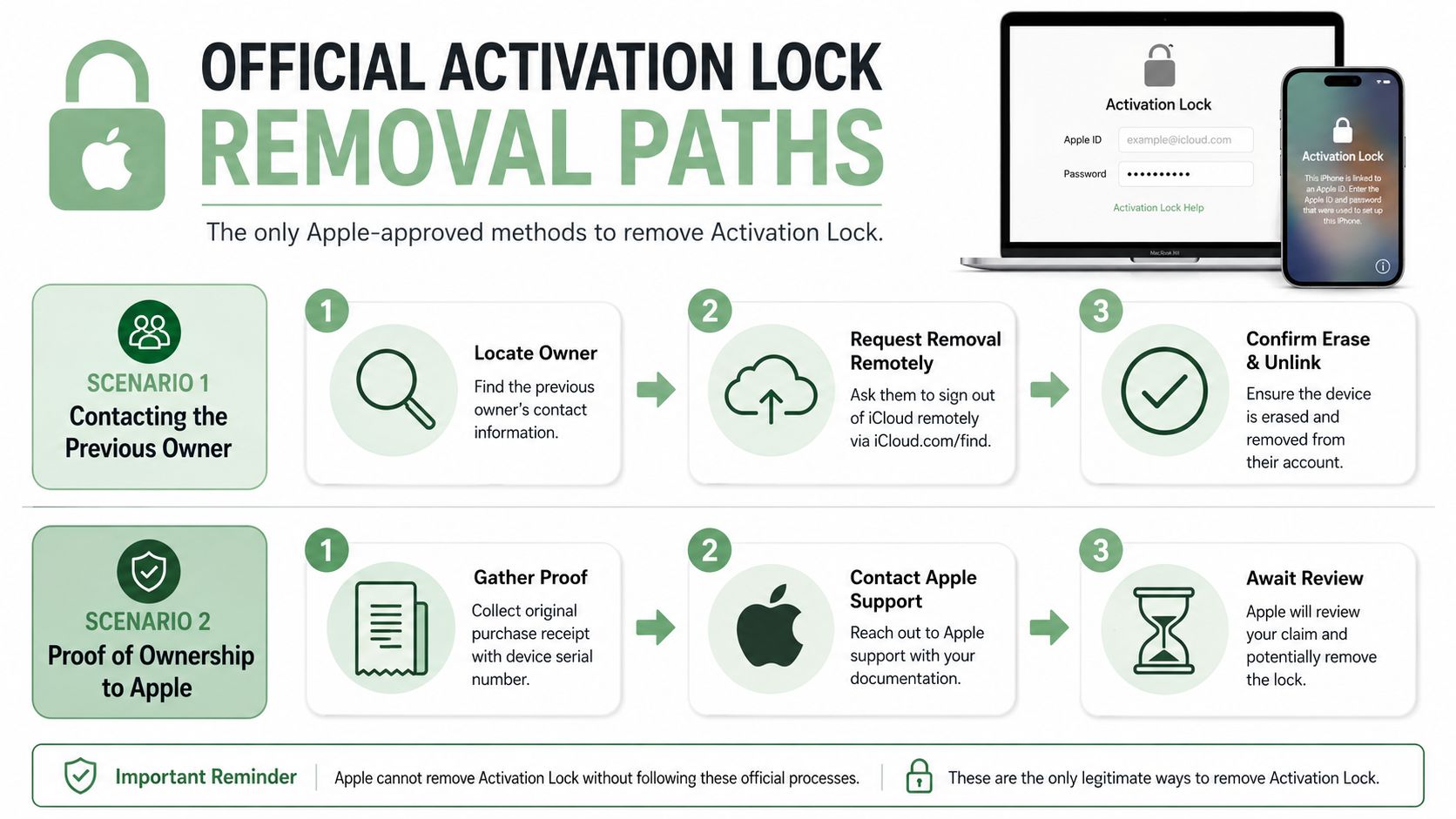
Apple's own guidance is the anchor point here. In Australia, the most authoritative route is Apple's official removal process through iCloud or Apple Support, including the Remove This Device action, and Apple notes that even if the device is offline, Activation Lock can sometimes still be removed on the web. Where the previous owner isn't available, users may be directed to Apple's removal pathway only if they have the necessary ownership documentation such as proof of purchase and device identifiers, as described in Apple's official guidance on removing Activation Lock from a device.
If you can reach the previous owner
This is the cleanest outcome. If the seller is legitimate, they should be willing to help.
Ask them to do the following from their side:
- Sign in to iCloud on the web or use Apple's support pathway
- Find the device tied to their account
- Select Remove This Device
- Confirm the device is no longer linked
If the device is already erased and sitting at the hello screen, remote removal is still often the fastest fix. The important point is that the removal must happen against Apple's account system, not just on the handset in front of you.
After that, restart the setup process and check whether the lock screen is gone.
A lot of sellers say they've already reset the phone. That may be true, but a reset alone doesn't necessarily remove the account link. A factory reset and an Activation Lock removal are not the same thing.
Here's a visual walkthrough of the official process in action:
If the previous owner is gone
Many buyers get stuck because the seller has disappeared, the marketplace account is inactive, or the device came through a deceased estate, business liquidation, trade-in lot, or mixed second-hand stock.
At that point, your only serious path is to prepare an ownership case for Apple. That means collecting paperwork first, then contacting Apple through the proper support channel.
Bring documents, not arguments. Apple cares about ownership records, not the story around the sale.
What proof usually needs to look like
In practical terms, the strongest documentation is the original purchase record tied to the device itself. Apple's process is built around proof of ownership, not possession. Holding the device in your hand isn't enough by itself.
Useful records can include:
- Original proof of purchase: Ideally from an authorised retail source and tied to the specific device.
- Device identifiers: The serial number and any matching identifier shown on the paperwork.
- Transfer trail: If you acquired the device second-hand, keep invoices, sale records, and correspondence.
If you're in the repair trade, this is also where broader right to repair in Australia discussions need to be separated from account security. A person may have every right to repair a device physically, but that doesn't mean a workshop can override an Apple ID lock.
What to expect from the process
The official path is slower than scam sites promise, but it's the only path that aims at a permanent server-side removal. Apple reviews what you submit. They may accept it, ask for more, or decline it.
That's frustrating, but it's still the only approach worth taking if your goal is a fully usable device with no hidden catch later.
A Guide for Australian Repair Shops and Technicians
A locked device at the counter creates pressure fast. The customer wants a fix. The staff member wants to help. The workshop sees a device that powers on and looks repairable. It is here that poor judgement leads to wasted labour and disputes.
The professional move is simple. Treat Activation Lock as an ownership issue first and a repair issue second.
What to tell the customer at the counter
Use plain language. Don't overcomplicate it.
A good front-desk script sounds like this:
- Acknowledge the problem: “The device is Activation Locked, which means it's still linked to an Apple ID.”
- Set the limit clearly: “We can repair physical faults, but we can't remove that lock in-store.”
- Point them to the next step: “If you can contact the previous owner or provide ownership documents to Apple, that's the proper path.”
That approach protects your workshop. It also protects the customer from paying for false hope.
If a shop takes money to “try a few things” on an Activation Locked device without ownership proof, that shop is drifting away from repair and into guesswork.
A clean workshop process
Shops do better when they standardise this.
Consider a workflow like this:
| Step | Workshop action | Why it matters |
|---|---|---|
| Intake | Record the model and visible lock status | Prevents later disputes about what was presented |
| Triage | Separate account locks from hardware faults | Stops wasted parts and labour |
| Documentation | Ask for receipt, invoice, or prior owner details | Establishes whether an official path exists |
| Approval | Decline unlock work outside official channels | Keeps the business on ethical ground |
A lot of technicians learn this the expensive way. They replace a battery to make the phone stable, fit a test screen to inspect it properly, or complete another repair request the customer bundled in. Then the device still can't be activated and the customer blames the shop.
Why expectation management is part of the repair
For Australian shops, this is also a privacy issue. A locked phone often arrives with an unclear ownership chain, unclear customer authority, and incomplete paperwork. Staff should be careful about handling accounts, identity details, and stored user data. This broader guide to phone repair data security and privacy is worth keeping in mind when writing intake policies.
The true value a technician provides here isn't a magic lock removal. It's accurate diagnosis, honest limitation, and a clear next action. That builds trust far better than pretending every locked device is recoverable.
How to Identify and Avoid Activation Lock Scams
The scam version of this market is easy to recognise once you know what to look for. It usually starts with a promise that sounds more like advertising copy than technical reality.
A website claims it can disable the activation lock on any iPhone by IMEI. A seller on social media says they have private software. A marketplace listing offers “clean activation lock removal”, “full bypass”, or “official server method” for an upfront fee. The language changes, but the pattern doesn't.
What scam offers usually sound like
Watch for these red flags:
- Guaranteed success claims: Real ownership reviews don't work like that.
- Instant turnaround promises: Account-linked locks aren't resolved by a mystery form and a payment screen.
- No paperwork needed: That directly clashes with the official ownership-based process.
- Vague technical language: “Premium server access” and “factory method” often mean nothing.
- Pressure tactics: “Limited slots”, “act now”, or “price doubles tonight” are there to rush you.
Many scam services rely on the fact that a locked device creates urgency. People have already spent money on the phone, so they're more likely to throw more money at a supposed solution.
If the offer avoids any discussion of proof of ownership, that's your warning sign.
Legitimate unlocking vs online scams
The differences become obvious when you compare them side by side.
| Attribute | Official Apple Process | Typical Online Scam Service |
|---|---|---|
| Basis for removal | Ownership and account review | Payment and promises |
| Previous owner involvement | Often important if available | Usually dismissed as unnecessary |
| Proof of purchase | Central to the process | Often claimed to be unnecessary |
| Permanence | Aims to remove the lock from Apple's side | Often temporary, fake, or unverifiable |
| Risk | Administrative and document-related | Financial loss, malware, data exposure |
| After reboot or restore | Should remain resolved if officially removed | Many “fixes” fail, disappear, or never existed |
The most dangerous version isn't always the one that takes your money and vanishes. Sometimes it sends you software to install, asks you to disable security settings on your computer, or requests personal information that has nothing to do with ownership verification.
What a cautious buyer or shop should do
If you're evaluating a service, pause and check three things:
- Does it explain lawful ownership?
- Does it say what the method is?
- Does it produce a result that survives normal setup and future restores?
If the answer to those questions is vague, the service isn't worth touching.
For shops, the safest position is to refuse referral relationships with device access brokers entirely. Once you recommend a bad actor, the customer remembers your name, not the website they paid.
The Hard Truth About Bypass Tools and DNS Methods
Some readers already know the scams are bad but still hope a “bypass” tool might be a technical workaround. That's where the confusion gets deeper. Bypass tools are often presented as if they remove Activation Lock, but most of them don't.
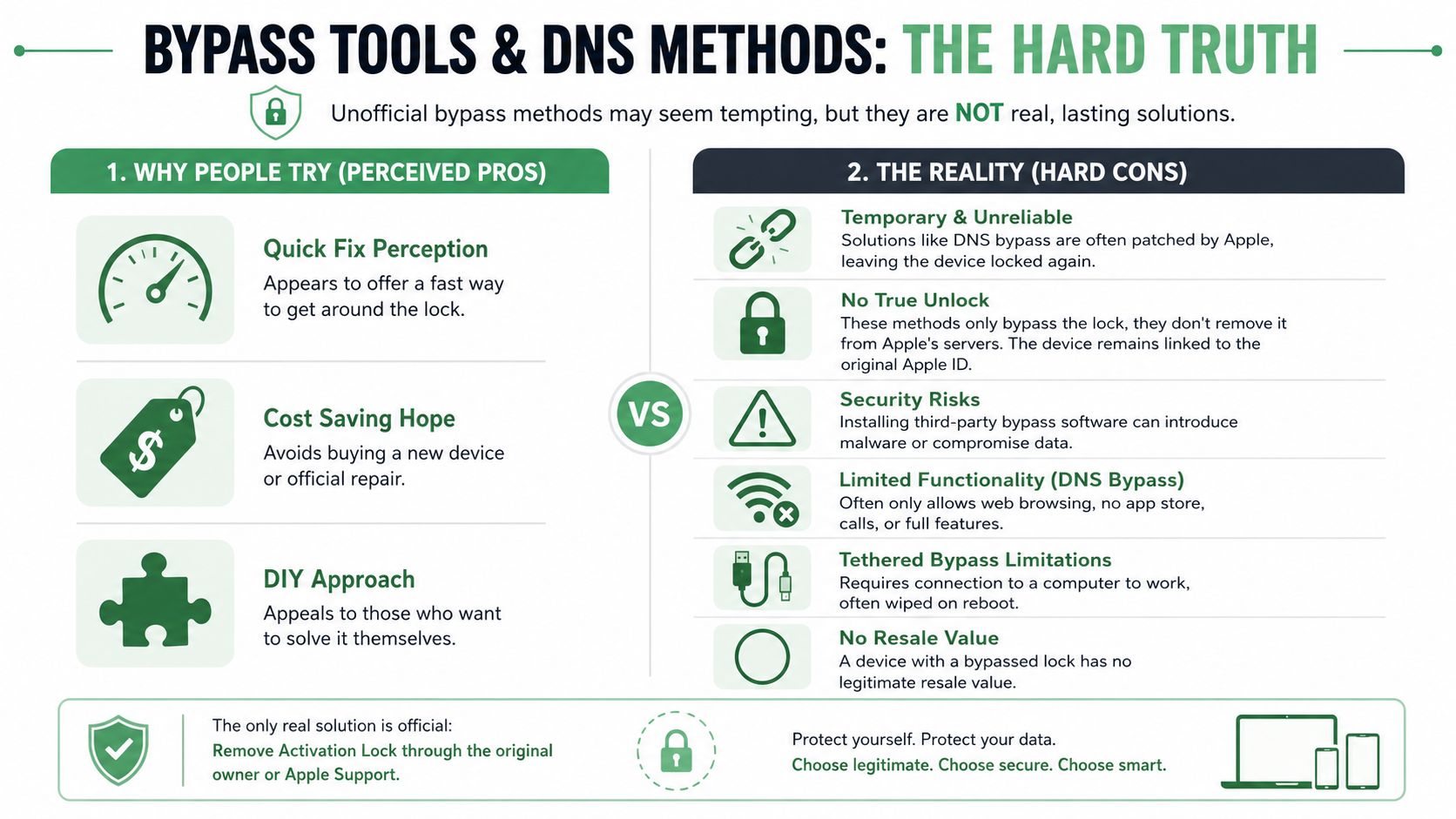
Apple support community guidance makes the key point plainly. Activation Lock can't be defeated without the original Apple ID unless you can prove ownership to Apple, such as with a sales receipt showing the serial number, and third-party bypass tools or DNS methods do not produce a permanent deactivation and may only provide limited functionality, as discussed in this Apple support community guidance video.
Why people keep trying them
The appeal is obvious.
- They seem cheaper than replacing the device
- They look faster than dealing with paperwork
- They give the user something to do immediately
- They're marketed as “advanced” methods
For a technician, they can also create false confidence. A handset may appear to move past one screen, boot further than before, or show partial access. That can look like progress when it's really just a different kind of limitation.
What these methods actually do
A DNS bypass doesn't completely delink the device from the Apple ID attached to it. It generally aims to divert part of the setup experience and expose limited functions rather than restoring full normal ownership control.
A tethered bypass typically depends on a computer connection or a repeated software-assisted state. Even when it appears to work, it may not survive a reboot, restore, update, or change in setup conditions.
That distinction matters. A phone that can't sign in normally, can't behave like a clean device after restore, or loses access after restart has not been properly cleared for use.
A temporary path around the screen is not the same thing as removal from Apple's servers.
From a resale perspective, that leaves the device in a bad place. It's not clean stock for a shop. It's not a reliable purchase for a consumer. It's not something you'd want to warranty.
The practical conclusion is blunt. If your goal is a normal, stable Apple device, bypass tools are a dead end.
Activation Lock Questions Answered
Can a new logic board remove Activation Lock
Not in the practical sense a buyer usually means. Activation Lock isn't fixed by swapping ordinary parts like displays, batteries, cameras, charging ports, or housings. If someone talks about solving it with parts alone, they're blurring the line between legitimate repair and replacing the identity of the device altogether, which isn't a normal answer to an ownership lock.
Should you buy a locked device cheaply and sort it out later
That's usually a bad gamble. If the seller can't remove the lock before sale or provide proper ownership records, you're buying uncertainty. Sometimes you're buying a device that will never become fully usable through legitimate means.
What matters most before buying used Apple gear
Check whether the device is ready to activate normally before money changes hands. Don't accept “just reset it at home” as reassurance. Ask the seller to remove their account properly and complete setup far enough to show the device is past the lock stage.
Can a repair shop verify ownership for me
A shop can review paperwork and explain whether your case looks strong, but it can't replace Apple's decision. Good shops diagnose. They don't certify ownership on Apple's behalf.
Is there any real shortcut
No shortcut beats a cooperative previous owner or proper proof of purchase. Everything else tends to trade certainty for risk.
If you run a repair shop or handle your own device repairs, Fixo is a solid Australian source for quality phone and smartwatch parts, tools, and DIY repair gear. Activation Lock isn't a parts problem, but when the device in front of you has a genuine hardware fault, having the right components and practical repair resources makes the rest of the job far easier.